Mender Gateway
Mender Gateway is only available in the Mender Enterprise plan. See the Mender plans page for an overview of all Mender plans and features.
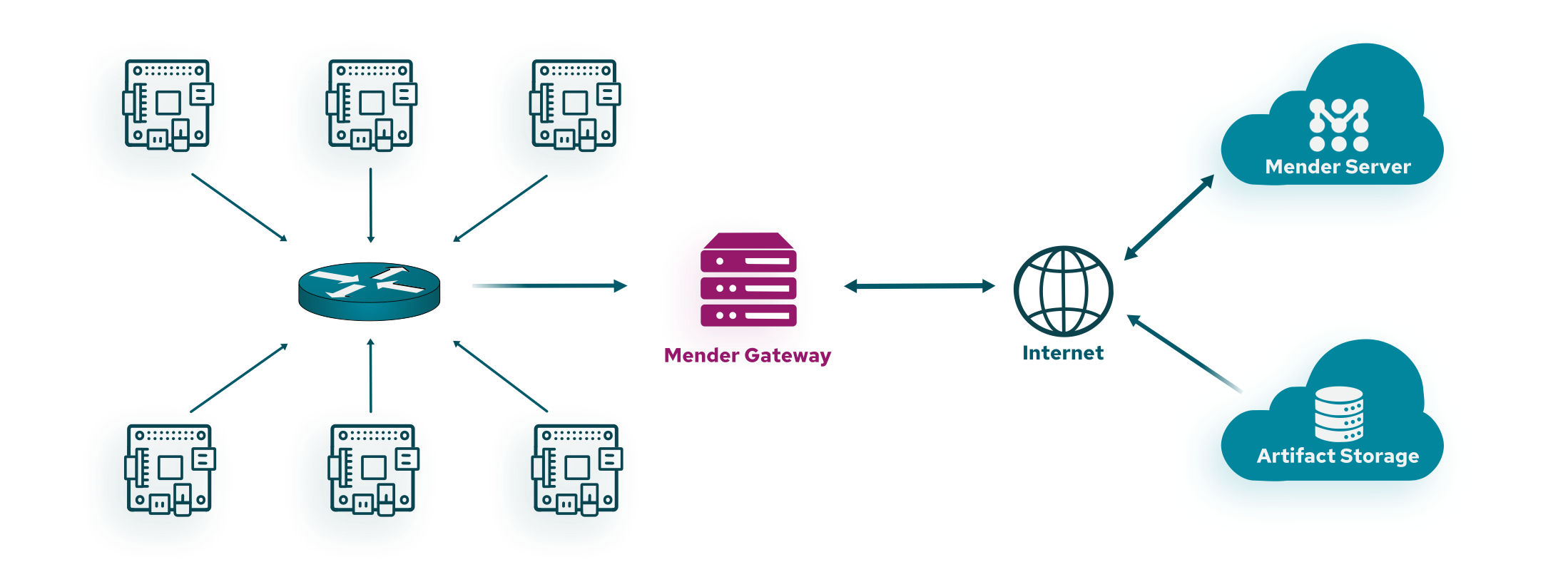
In segregated networks, most devices may operate without direct access to the Internet. In such networks, typically only a gateway has Internet access and offers a limited set of services to devices in the local network. Mender Gateway is such an application service that runs on the gateway and enables managing and deploying OTA updates to devices on the local network. The gateway acts as a proxy with the ability to understand and serve client requests locally.
Mender Gateway operates by proxying requests from a local HTTP(S) server on the local network to the upstream Mender Server. It is capable of proxying Artifacts from an s3-compatible file server to the devices and enabling mutual TLS authentication requests on behalf of devices.
Artifact Proxy and Cache
The Mender Gateway can understand when a device has an available update and serves Artifacts on the server's behalf. Without this feature, the device would try downloading the Artifacts referenced by the download link contained in the deployment instructions directly from the internet. The Mender Gateway will instead replace the download link in the deployment instructions with a local URL served by itself.
It can also cache the Artifacts locally and serve them locally when needed. In this way, when multiple devices request the same Artifact, it will be downloaded only once and then served from the cache for the subsequent download requests saving bandwidth. The Mender Gateway will automatically manage the cache eviction when the Artifacts cache is enabled if there is no more free space on the path specified in the configuration file. Freeing up disk space will remove cached Artifacts that are not being served anymore to clients starting from the oldest one. It is highly recommended to use a dedicated partition or volume to store the Artifacts on the Gateway device to avoid Mender Gateway filling up the root file system or the data partition.
The cache feature can be enabled by setting the configuration option
ArtifactsCache to true in the mender-gateway.conf configuration
file as shown in this example:
{
    "HTTPS": {
        "Enabled": true,
        "Listen": ":443",
        "ServerCertificate": "/usr/share/doc/mender-gateway/examples/cert/cert.crt",
        "ServerKey": "/usr/share/doc/mender-gateway/examples/cert/private.key"
    },
    "Features": {
        "ArtifactsProxy": {
            "Enabled": true,
            "GatewayURL": "https://gateway.docker.mender.io",
            "DomainWhitelist": ["s3.amazonaws.com"],
            "ArtifactsCache": {
                "Enabled": true,
                "Path": "/var/cache/mender-gateway"
            }
        }
    },
    "UpstreamServer": {
        "URL": "https://hosted.mender.io"
    }
}
Grouping Devices behind a Gateway
You can group the devices connected to a given Mender Gateway on the Mender Server by using the following inventory attribute in a Dynamic Group.
You can also use the Mender Gateway to facilitate working with devices from a group, Mender Gateway provides a mechanism to
add a special inventory attribute named mender_gateway_system_id to the inventory data
reported by all devices connected to it. The value of the attribute can be configured with the following
configuration (with replacing of REPLACE_WITH_YOUR_UNIQUE_SYSTEM_ID):
{
    "HTTPS": {
        "Enabled": true,
        "Listen": ":443",
        "ServerCertificate": "/usr/share/doc/mender-gateway/examples/cert/cert.crt",
        "ServerKey": "/usr/share/doc/mender-gateway/examples/cert/private.key"
    },
    "Features": {
        "ArtifactsProxy": {
            "Enabled": true,
            "GatewayURL": "https://gateway.docker.mender.io",
            "DomainWhitelist": ["s3.amazonaws.com"]
        },
        "DeviceSystem": {
            "Enabled": true,
            "SystemID": "REPLACE_WITH_YOUR_UNIQUE_SYSTEM_ID"
        }
    },
    "UpstreamServer": {
        "URL": "https://hosted.mender.io"
    }
}
The name of the mender_gateway_system_id inventory attribute is pre-defined to ensure
consistency and to allow Mender Server recognize the devices belonging into a particular
devices group.
In order to add other common attributes that are not pre-defined, but are still added for all
devices connected to a particular Mender Gateway, the DefaultInventory setting can added to
the config as shown below:
{
    "Features": {
        "DeviceSystem": {
            "Enabled": true,
            "SystemID": "REPLACE_WITH_YOUR_UNIQUE_SYSTEM_ID",
            "DefaultInventory": [
                {
                    "Name": "region",
                    "Value": "eu"
                },
                {
                    "Name": "customer_name",
                    "Value": "ACME Inc."
                }
            ]
        }
    }
}
Mutual TLS Authentication
The Mender Gateway is capable of automatic provisioning of devices using mTLS authentication. Any device with a valid certificate signed by the Certificate Authority (CA) configured on the gateway, is automatically accepted by the Mender Server. See the mTLS user guide for a reference mutual TLS setup in a testing environment.
Monitoring with Prometheus metrics
Mender Gateway can expose a Prometheus-compatible
/metrics endpoint for monitoring and alerting. The endpoint is served by a
separate HTTP server, listening on :9102 by default and independent of the
device-facing proxy, so if it fails to start the error is logged and the gateway
keeps serving device traffic. The feature is disabled by default and enabled
with the Metrics section of the configuration file:
{
    "HTTPS": {
        "Enabled": true,
        "Listen": ":443",
        "ServerCertificate": "/usr/share/doc/mender-gateway/examples/cert/cert.crt",
        "ServerKey": "/usr/share/doc/mender-gateway/examples/cert/private.key"
    },
    "UpstreamServer": {
        "URL": "https://hosted.mender.io"
    },
    "Metrics": {
        "Enabled": true,
        "Listen": ":9102"
    }
}
The endpoint reports counters for the number of API requests
(mender_gateway_http_requests_total) and the response bytes served
(mender_gateway_http_response_bytes_total), each labelled by request method,
status code, and the matched route, together with a set of Go runtime and
process memory gauges and the process start time for detecting restarts. Because
requests are labelled by the matched route rather than the raw URL, the number
of time series stays bounded to the gateway's registered routes.
The metrics endpoint is not authenticated. The default :9102 binds every
interface, so set Listen to an address on a trusted network — for example
127.0.0.1:9102 to expose it only on the gateway host.